Making ID photos with AI in the browser: how it was built, what was measured, what broke
1. The problem and the constraints
An ID photo has fairly rigid requirements: a plain background (white, blue or red depending on the receiving office), a face looking straight ahead, an upright head, the head filling a given share of the photo height, and a standard print size and resolution. Doing it by hand in an image editor means cutting the person out, rotating, cropping to size, filling the background and sharpening. The goal was to automate that chain under these constraints.
- Everything in the browser. No backend: a face photo is personal data, and not sending it anywhere also means not having to run, pay for or secure a server.
- Static hosting. The website lives on GitHub Pages, which cannot set the
Cross-Origin-Opener-PolicyandCross-Origin-Embedder-Policyheaders. Without them the browser withholdsSharedArrayBuffer, so WebAssembly runs on a single thread. This constraint drove the model choice in Section 2. - Licences that allow commercial use. The product sits on a business website, so only components with suitable licences were considered.
- Quality over speed, but the wait has to stay in the tens of seconds, not minutes.
2. Choosing the technology
The candidate list was MediaPipe, YuNet and SCRFD for face detection; MODNet, BiRefNet, IS-Net (packaged in IMG.LY’s library), PICORN and RMBG for background removal; Real-ESRGAN, SwinIR and OpenCV.js for sharpening; and ONNX Runtime Web, Transformers.js and WebGPU as runtime. I judged them with four questions: does it give enough geometry, does the licence allow commercial use, how heavy is it, and does it work on single-thread WebAssembly.
| Stage | Chosen | Why | Left out |
|---|---|---|---|
| Face detection and alignment | MediaPipe Face Landmarker (478 landmarks, Apache-2.0, 3.76 MB) | Gives both iris centres, the chin and the face edges at once: enough to compute tilt and head height from a single model | YuNet, SCRFD: a box and a few points, not enough to measure head proportions |
| Background removal | MODNet (Apache-2.0, ONNX fp16, 12.98 MB) | Portrait-specific, no trimap, soft alpha output (including hair) | IMG.LY is AGPL. RMBG is non-commercial. BiRefNet and PICORN: not tried here, given the time budget on single-thread WebAssembly |
| Model runtime | ONNX Runtime Web 1.20.1, WebAssembly, in a Web Worker | MIT, stable, loaded from a CDN so the repo stays small | WebGPU: not widespread enough to be the main path |
| Sharpening | Hand-written unsharp mask on canvas | An ID photo needs only mild sharpening; super-resolution invents detail and is heavy in a browser | Real-ESRGAN, SwinIR (listed under future work) |
| Edge cleaning | Guided filter + Blur-Fusion | Two short algorithms, easy to implement, no need for OpenCV.js (several MB) | OpenCV.js |
Two points. First, the authoritative licence text lives in each model’s own repository, not in a roundup article, so I re-read the licences of MODNet, MediaPipe and ONNX Runtime before committing. Second, “lightest” is not “best for this job”: a detector that returns only a face box cannot tell you how many degrees the head is tilted.
3. Testing the model outside the browser first
Before writing any JavaScript I used Python and onnxruntime to check the pre- and post-processing and to compare three variants of MODNet on a public-domain portrait. Input convention: RGB normalised as (x − 0.5) / 0.5, NCHW layout, shorter side 512, both sides divisible by 32; the output is a single alpha channel in [0, 1].
| Variant | Size | Mean abs. difference from fp32 | 99th percentile | Remark |
|---|---|---|---|---|
| fp32 | 25.9 MB | — | — | reference |
| fp16 (fp16 weights, float32 in/out) | 13.0 MB | 0.0001 | 0.0010 | indistinguishable from fp32 in practice |
| int8 (quantized) | 6.6 MB | 0.161 | 0.9998 | broken: mean alpha 0.377 vs 0.532 |
The result is surprising if you are used to int8 working well on small classifiers (see the int8 quantization post): a dense matting network, where every pixel needs an accurate continuous value, is far more sensitive to coarse weights and activations. I used fp16: half the download for practically the same output. One caveat on timing, measured once on native CPU for a single image: fp32 2.88 s, fp16 4.23 s, int8 4.18 s. fp16 is not faster on CPU because of the type conversion; its benefit is download size, not speed.
4. Architecture: two phases
The heavy work (face detection, matting) runs once per photo. The parameters people tweak (size, background colour, head ratio, sharpness, edge softness) only affect the render stage, so it is kept separate and dragging a slider shows the result at once.
Phase 1 - analysis (once per photo, ~15-25 s)
  photo -> decode (respecting EXIF) -> MediaPipe: 478 landmarks -> tilt, eyes, chin
        -> MODNet (ONNX Runtime Web, worker): coarse alpha at 512 resolution
        -> upscale alpha to the photo size -> guided filter snapping to source edges
        -> geometry: eye centre, angle theta, head height (crown -> chin)

Phase 2 - render (instant, re-run whenever a setting changes)
  rotate + scale + centre -> ID-photo frame
  -> foreground colour estimate (Blur-Fusion) -> composite on background
  -> optional levels -> unsharp mask -> PNG/JPG at 300 DPI + print sheet
All the code is one JavaScript file (about 520 lines) with no libraries other than ONNX Runtime Web and MediaPipe, both loaded from a CDN. The two models (modnet-fp16.onnx, 12.98 MB, and face_landmarker.task, 3.76 MB) live in the website repo. The first visit downloads about 37 MB in total, including both libraries’ WebAssembly; later visits use the browser cache.
5. Geometry: rotation, head ratio and placement
5.1 Tilt from the eyes
Face Landmarker returns 478 points; points 468 and 473 are the iris centres. With \(\mathbf e_A\) and \(\mathbf e_B\) the two eye centres (ordered left to right in the image), the tilt angle and the inter-eye distance are
$$\theta=\operatorname{atan2}(e_{B,y}-e_{A,y},\;e_{B,x}-e_{A,x}),\qquad E=\lVert\mathbf e_B-\mathbf e_A\rVert.$$Every point \(\mathbf p\) is expressed in an “upright” frame with its origin at the eye midpoint \(\mathbf c_0\):
$$\begin{pmatrix}x'\\y'\end{pmatrix}=\begin{pmatrix}\cos\theta&\sin\theta\\-\sin\theta&\cos\theta\end{pmatrix}\begin{pmatrix}p_x-c_{0,x}\\p_y-c_{0,y}\end{pmatrix}.$$In this frame both eyes sit on one horizontal row, and the eye-to-chin distance (landmark 152) is \(H_{ec}=y'_{\text{chin}}\).
5.2 Crown: measured from the matte, clamped by body proportions
ID-photo head height runs from crown to chin, but Face Landmarker has no reliable crown point (hair gets in the way). I take the crown from the matte: rotate the alpha into the upright frame and scan upward from the eye row inside a column band around the face centre; the first row with at least 3 pixels of alpha above 0.5 is the crown. With big hair, a hat or a segmentation error that can be far off, so there are two safeguards. If the matte gives nothing, use the estimate \(y'_{\text{crown}}=-1.17\,H_{ec}\). If the matte value falls outside \([-1.6\,H_{ec},\,-0.95\,H_{ec}]\), clamp it to that range. The 1.17 factor and the two bounds are empirical coefficients of mine, derived from the ratio of eye-to-chin distance to head height; they are not a regulation.
5.3 Mapping into the ID-photo frame
Let \(\rho\) be the head ratio (head height over photo height) and \(h_{out}\) the output height in pixels. The scale is \(\sigma=\rho\,h_{out}/H_{head}\) with \(H_{head}=H_{ec}-y'_{\text{crown}}\). The transform is implemented as a canvas matrix:
$$a=\sigma\cos\theta,\quad b=-\sigma\sin\theta,\quad c=\sigma\sin\theta,\quad d=\sigma\cos\theta,$$translated so that the point on the crown line directly above the face centre lands at \((w_{out}/2,\;m)\) with top margin \(m=h_{out}(1-\rho)\cdot 0.36\). The 0.36 splits the non-head remainder of the photo roughly 36% above the head and 64% below (neck and shoulders). Sizes and default head ratios:
| Size | mm | Pixels at 300 DPI | Default head ratio \(\rho\) |
|---|---|---|---|
| 3×4 | 30×40 | 354×472 | 0.70 |
| 4×6 | 40×60 | 472×709 | 0.72 |
| 2×3 | 20×30 | 236×354 | 0.70 |
| 35×45 | 35×45 | 413×531 | 0.75 |
| 2×2 inch | 50.8×50.8 | 600×600 | 0.60 |
These are common defaults that the user can adjust with a slider; exact rules depend on the receiving authority, so check them before submitting.
var scale = ratio * outH / g.headPx;
var topMargin = outH * (1 - ratio) * 0.36;
var a = scale * cs, b = -scale * sn, c = scale * sn, d = scale * cs;
var e = outW / 2 - (a * P0x + c * P0y), f = topMargin - (b * P0x + d * P0y);
rctx.setTransform(a, b, c, d, e, f);   // draw the source into the ID-photo frame
rctx.drawImage(S.src, 0, 0);
6. Cleaning the edge: from a coarse alpha to a composite
6.1 Guided filter
MODNet runs with the shorter side at 512 pixels, so its alpha is coarse and staircased at the hair edge once scaled up to the source. The guided filter (He, Sun, Tang, 2013) filters the alpha \(p\) using a guide image \(I\) (here the grayscale of the source), so the alpha’s edges snap to real image edges. In every window the output is a linear function of the guide:
$$q_i=\bar a_i I_i+\bar b_i,\qquad a_k=\frac{\operatorname{cov}_k(I,p)}{\operatorname{var}_k(I)+\varepsilon},\qquad b_k=\bar p_k-a_k\bar I_k,$$where \(\bar a_i,\bar b_i\) are the means of \(a_k,b_k\) over the windows containing pixel \(i\). I implemented it with separable box filters computed by running sums, so the cost does not depend on the radius, using \(r=\max(3,\operatorname{round}(\max(W,H)/260))\) and \(\varepsilon=10^{-4}\).
6.2 Foreground colour estimation (Blur-Fusion)
Even with a correct alpha, compositing \(C=\alpha F+(1-\alpha)B'\) over a new background \(B'\) still shows a fringe if you reuse the source colour \(I\) as \(F\): a pixel on the hair edge is a mix of hair and the old background, so the fringe carries the old background colour (a white halo around hair when switching to a blue background). You need an estimate of the foreground colour \(F\) with the old background removed from semi-transparent pixels. Blur-Fusion (Forte, 2021) does this with a few blurs:
$$\hat F=\frac{\overline{F\alpha}}{\bar\alpha}+\alpha\Bigl(I-\alpha\frac{\overline{F\alpha}}{\bar\alpha}-(1-\alpha)\frac{\overline{B(1-\alpha)}}{1-\bar\alpha}\Bigr),$$where an overbar is the mean over a window. I run two passes like the author’s reference code: the first uses a large window (radius \(\max(9,\,h_{out}/14)\) pixels), the second a small window (radius 3) on the first pass’s result.
6.3 Sharpening and levels
Sharpening is an unsharp mask, \(I'=I+k\,(I-G_\sigma*I)\), with the Gaussian approximated by three box passes, \(\sigma=\max(0.8,\,h_{out}/520)\), and differences under 2 grey levels ignored so that noise is not amplified. The amount \(k\) is suggested automatically from the sharpness of the face region, measured as the variance of the Laplacian \(\mathrm{Var}(\nabla^2 I)\): under 25 gives \(k=1.4\), under 60 gives 1.1, under 140 gives 0.75, otherwise 0.45. A photo that is already sharp is therefore not over-processed, and a blurry one gets more. The optional levels step stretches the range between the 1st and 99th percentile of subject brightness and blends 60% of that with the original so it stays natural.
7. Running the model in the browser
GitHub Pages has no SharedArrayBuffer, so ONNX Runtime Web runs on one thread. The first version ran inference on the main thread and froze the whole page during matting; the test harness even timed out because the page stopped responding. Setting ort.env.wasm.proxy = true moves inference into a Web Worker and fixes it: sliders still drag and the language still switches while you wait. Initialisation:
libs.ort.env.wasm.wasmPaths = ORT_BASE;      // jsDelivr, onnxruntime-web 1.20.1
libs.ort.env.wasm.proxy = true;               // inference runs in a worker
libs.ort.env.wasm.numThreads = crossOriginIsolated ? Math.min(4, hw) : 1;
libs.session = await libs.ort.InferenceSession.create(modelBuf,
  { executionProviders: ['wasm'], graphOptimizationLevel: 'all' });
If the site later moves to hosting that can send the two isolation headers, this code will use up to 4 threads automatically.
8. Results on real photos
I tested in a real Chrome (driven over CDP), loading photos into the file input as a user would and timing from load to result. The demo photo in this post is a portrait of the Vietnamese swimmer Nguyễn Thị Ánh Viên, a front-facing shot chosen because its licence allows editing and republishing. Below are the original and three results for the same photo, each produced entirely in the browser:
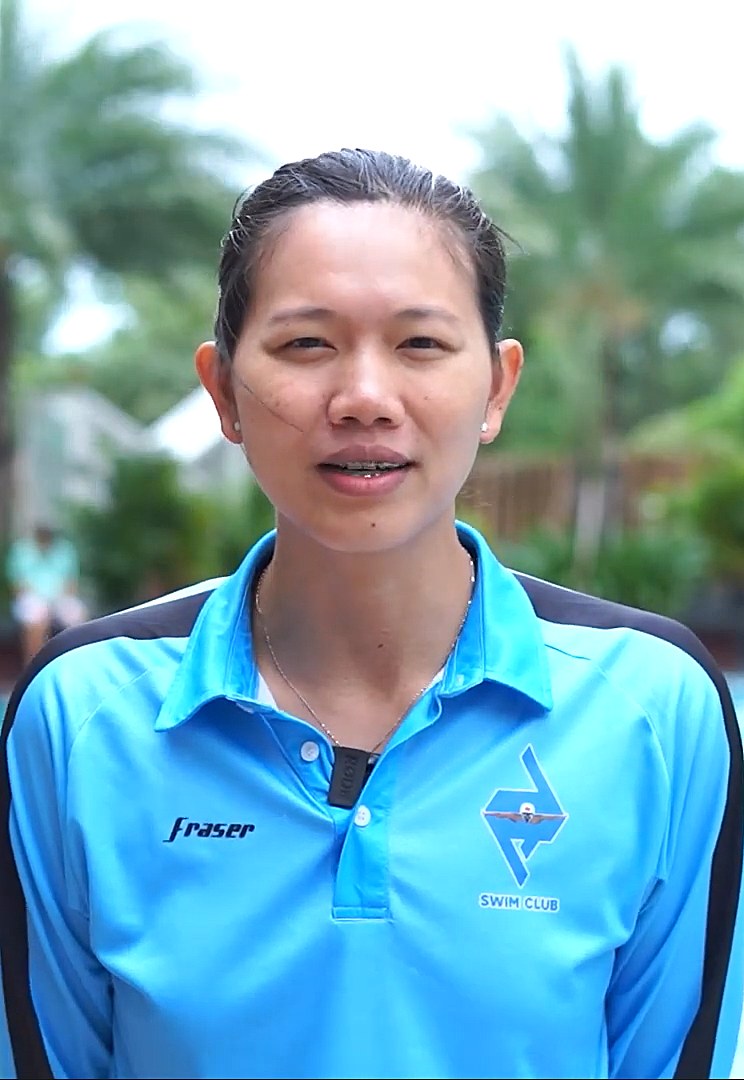
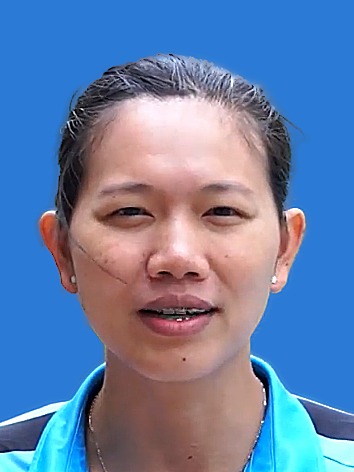
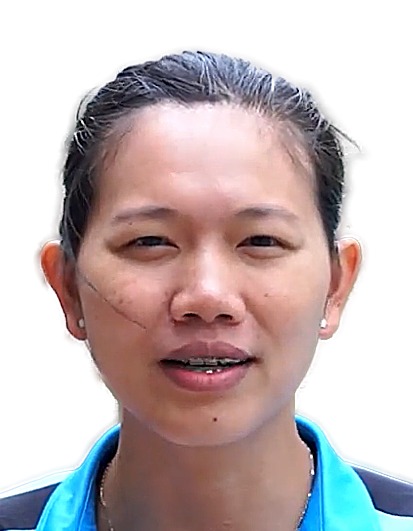
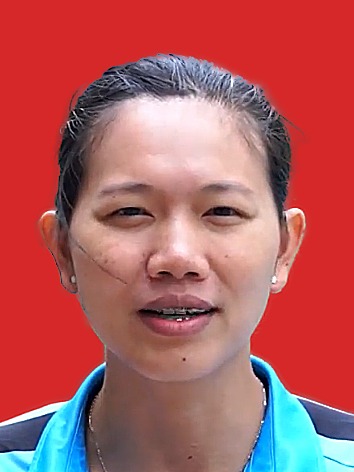

For this photo the tool needed no rotation (already upright), kept even the loose strands of hair at the crown, and the head fills about 70% of the height at 3×4 (judged by eye on the output). The same analysis can also output a 10×15 cm print sheet with nine 3×4 photos:
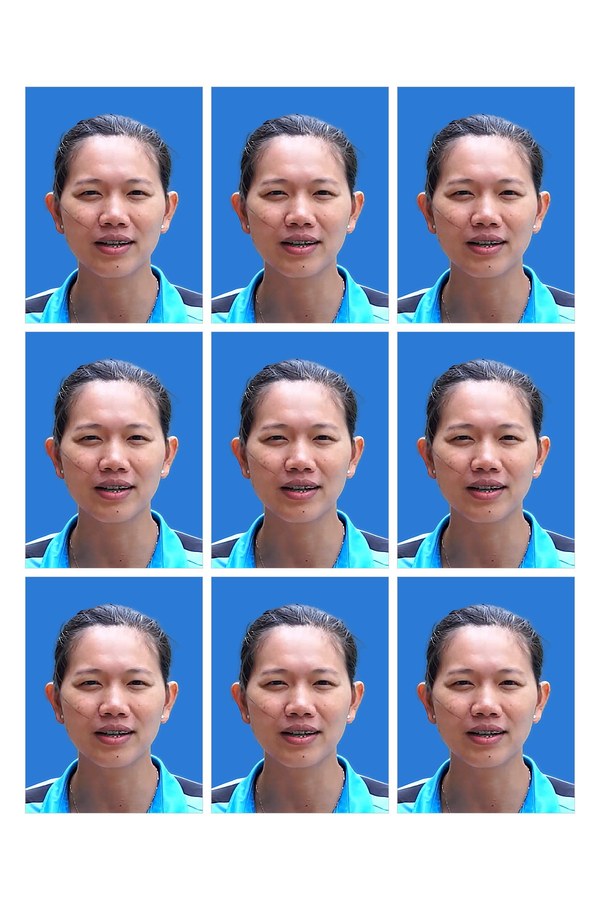
A tilted-head case
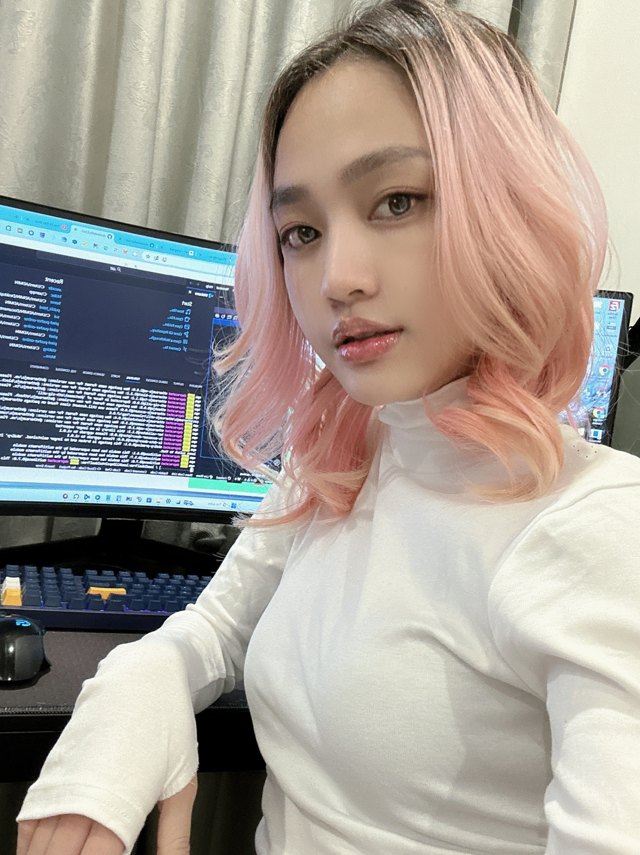
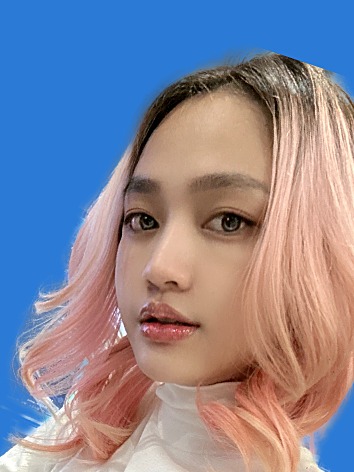
The photo below is a selfie with the head tilted and slightly turned. The tool measured a tilt of \(-18.5^\circ\) and straightened it; it illustrates the alignment step, not a valid ID photo (a turned pose does not meet the front-facing requirement of a real ID photo).

Timing table and other cases
| Test photo | Size / background | Time | Result |
|---|---|---|---|
| NASA portrait 700×900 | 3×4 / blue | 17.5 s | auto-rotated \(-5.4^\circ\), clean edge; a “low face resolution” warning because the photo is small |
| Same photo, rotated a further \(14^\circ\), 1600 px | 35×45 / red | 20.1 s | measured \(-19.3^\circ\) (\(14^\circ\) plus the original \(5.4^\circ\) tilt), upright result |
| Astronaut in a white suit | 2×2 inch / white | 27.3 s | head separated well; the white suit stays because it is foreground, its edge blends slightly into the white |
| Tilted selfie (above) | 3×4 / blue | 21.6 s | measured \(-18.5^\circ\), straightened |
| Ánh Viên (above) | 3×4 / blue | 18.0 s | good, no rotation needed |
| Ánh Viên | 35×45 / white | 20.0 s | good; a very faint light halo remains around the ears and hair |
| Ánh Viên | 3×4 / red | 104.8 s | result fine; the time is far outside the other runs, cause not identified |
| Cat photo (no face) | 3×4 | 6.8 s | correct error: no face found |
The six runs on photos with a face (excluding the 104.8 s one) fall between 17.5 and 27.3 s, median about 20 s, on one test machine with single-thread WebAssembly. These are one machine’s numbers, not a benchmark; another machine will differ. After deploying I re-ran one photo on shopsmon.com itself (4×6, white background): the model and libraries loaded from the CDN and the sheet laid out four photos. No run produced a console error.
9. Bugs hit and how they were fixed
| Symptom | Cause | Fix |
|---|---|---|
| Page freezes during matting, the test harness times out | Inference on the main thread | ort.env.wasm.proxy = true (Web Worker) |
| Head fills about 58% instead of 70% | Wrong crown clamp range: \([-2.1,\,-1.45]\cdot H_{ec}\) | Recomputed as \([-1.6,\,-0.95]\cdot H_{ec}\) with the estimate \(-1.17\,H_{ec}\); afterwards the head fills about 72% on the test photo |
| Completely wrong alpha with int8 MODNet | Quantization breaks the matting network | Use the fp16 variant |
Elements with the hidden attribute still show | CSS display:grid overrides the attribute | Add [hidden]{display:none!important} |
The page generator sometimes fails with OSError 22 writing a file on Windows | Transient error while another process scans the file | Retry loop, up to 8 attempts |
| Wrong author list on the Blur-Fusion citation | An extra author added that is not on the paper | Checked the DOI, fixed to a single author (M. Forte) |
The second bug is the most instructive: it showed up in no automated check, because the program ran smoothly and the photo looked “reasonable”. I only caught it by measuring the head ratio on the output and comparing it with the set value (70%). The lesson for image products: open the output image and measure it, do not just check that nothing threw an error.
10. Limitations
- A background of the same colour as the clothing (white clothes on white) can make part of the background or clothing be misjudged; the astronaut case above is an example.
- On white backgrounds a very faint light halo can remain around the ears and hair, because the alpha at the edge is not perfectly accurate.
- A small photo makes a blurry ID photo when enlarged; the tool warns instead of inventing detail.
- The crown depends on the matte, so big hair, hats and head coverings reduce the accuracy of the head ratio; a slider lets the user adjust it by hand.
- The tool does not check for closed eyes, an open mouth or reflective glasses; an authority may still reject a photo of the right size.
- Processing takes about 15-30 s on one thread; the first load is about 37 MB.
- Not yet tested on a real phone, Safari or Firefox.
11. Future work
- WebGPU for ONNX Runtime Web, or hosting that allows
SharedArrayBufferso multiple threads can be used. - A “high quality” option with a larger matting model (such as BiRefNet), downloaded only when selected.
- A small super-resolution model (for example a light Real-ESRGAN) only when the source photo is too small.
- Quality warnings before generating: closed eyes, strong head tilt, glasses, hats.
- More country-specific sizes and print-sheet layouts.
12. The reusable process
- Fix the constraints (hosting, licence, time budget) before comparing models.
- Rule out components with unsuitable licences early.
- Try the model in Python, settle pre-processing and numeric variant (fp32, fp16, int8), then write the JavaScript.
- Separate the heavy phase from the light one; run the heavy phase in a worker.
- Test end to end in a real browser with photos whose source and licence are clear; open the output and measure it.
- Test the bad cases: no face, rotated photo, background matching clothing, small photo.
- Deploy, wait for the CDN, and re-run a test against the live site.
I take this on as a freelancer. Describe the idea in a few sentences and I will reply with questions and a fixed-scope quote.
Try the tool Get a quote
References
- Z. Ke, J. Sun, K. Li, Q. Yan and R. W. H. Lau. “MODNet: Real-Time Trimap-Free Portrait Matting via Objective Decomposition.” Proceedings of the AAAI Conference on Artificial Intelligence, 36(1), 2022. doi:10.1609/aaai.v36i1.19999.
- K. He, J. Sun and X. Tang. “Guided Image Filtering.” IEEE Transactions on Pattern Analysis and Machine Intelligence, 35(6), 2013, pp. 1397–1409.
- M. Forte. “Approximate Fast Foreground Colour Estimation.” IEEE International Conference on Image Processing (ICIP), 2021. doi:10.1109/ICIP42928.2021.9506164.
- Google. “MediaPipe Face Landmarker.” Google AI Edge documentation, ai.google.dev/edge/mediapipe.
- Microsoft. “ONNX Runtime Web.” onnxruntime.ai/docs/tutorials/web.